Preview a print run
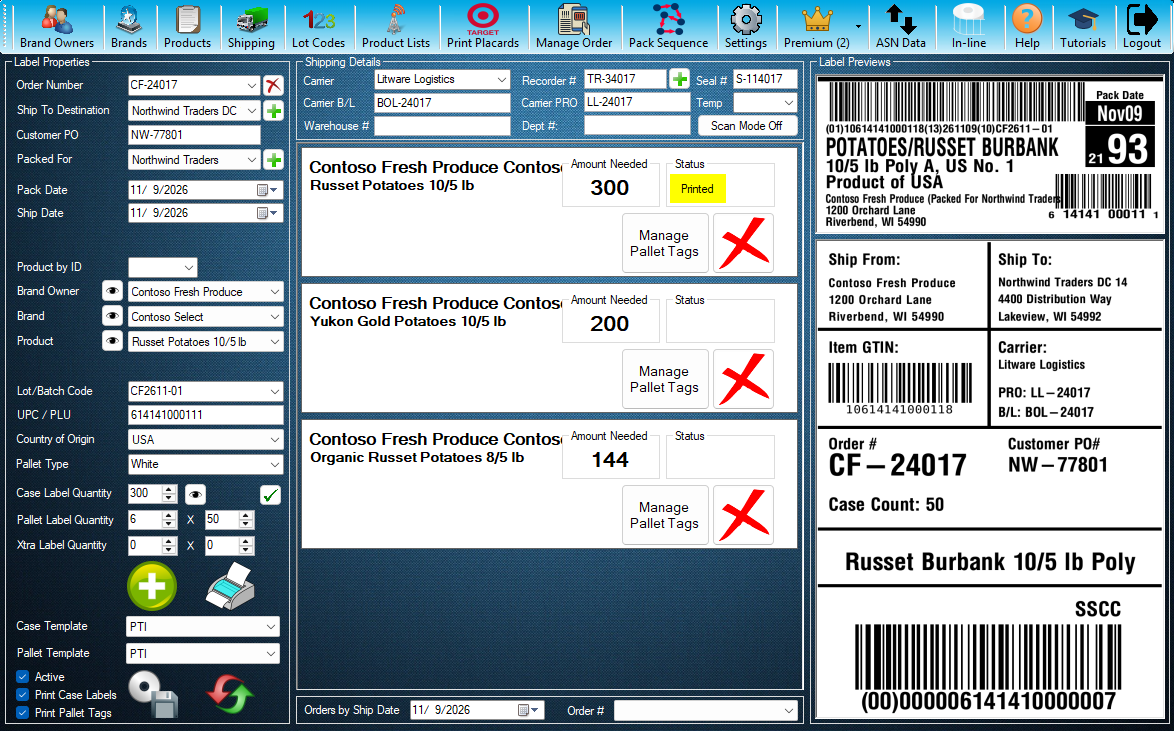
See the case label, the first and last pallet tags and the next serials before you print. Pick an order and a product first.
- 8 steps
- Also built into myPTI
- Premium feature
Step 1 / 8
Label preview
Combined label preview is a myPTI Premium feature. It is in the Premium menu, and the eye button just right of Case Label Quantity opens it too. Open Premium to go on.
Click the highlighted control, or press Next.
Step 1 of 8: Label preview
All 8 steps
Every step, as text
The same steps as the interactive tutorial above. Select a step to open it there.
- 01Label previewCombined label preview is a myPTI Premium feature. It is in the Premium menu, and the eye button just right of Case Label Quantity opens it too. Open Premium to go on.
- 02Open the label previewPress Combined label preview. Without Premium you can still look around: Combined label preview opens just for this tutorial and closes when it ends.
- 03Case labelWhat Print would make now for the order and product on the main screen, starting with the case label. Nothing is printed or saved here.
- 04First pallet tagThe first pallet tag of the run, with its serial number.
- 05Last pallet tagThe last pallet tag of the run, so you can check the serial range before you print.
- 06Pallet tag serialsEvery serial the run would use, with its SSCC. They are the next available and may change: another print station can use them first.
- 07Print runHow many case labels, pallet tags and Xtra tags the run makes, and the serial range.
- 08RefreshReads the serials and draws the labels again. Close this window when you are done.
Keep going
Up next
- Premium
Premium features
Keep a to-do list for your crew
Add, edit and delete shared tasks, and see who added each one and when.
8 stepsStart - Premium
Premium features
Send and read messages
Send messages and files to your team, your company or myPTI Support, and file what you receive.
9 stepsStart - Premium
Premium features
Run a mock recall
Trace a lot forward to every shipment and save the mock recall report for your audits.
7 stepsStart
Ready to print your first compliant label?
Email us for a free trial account. We'll set you up, and the tutorials take it from there.